Overview
What is a machine connector?
A machine connector is a plugin that acts as a middleware to communicate between the Venafi Platform to any 3rd party applications. The connector is responsible for authenticating, pushing, and configuring the certificate from Venafi to any application of the client's choice.
In the Venafi world, every connector is a REST-based web service with certain predefined APIs implemented to perform a task. Venafi provides a connector framework to help build more connectors easily to support the clients' ecosystem.
What is a machine connector framework?
The Venafi machine connector framework provides the following:
- Step-by-step guidance
- An easy to use template
- A faster way to build and test a CyberArk Certificate Manager - SaaS connector
This connector framework focuses primarily on target application platforms such as web servers, network devices, etc. This framework makes it easy for developers to build a new connector in a few simple steps and removes the complexities of execution or supportability within the CyberArk Certificate Manager - SaaS environment.
This connector framework gives the freedom and flexibility to define UI fields in the Certificate Manager - SaaS UI using JSON form components and the back-end as a REST web service. Venafi provides a simulation environment to seamlessly validate the UI and end-to-end execution so a developer can focus on writing the back-end connector code without worrying about the complex execution model.
📘 Note
To work effectively with any Venafi connector framework, you must have some working knowledge of the Go Programming language.
How do I get started?
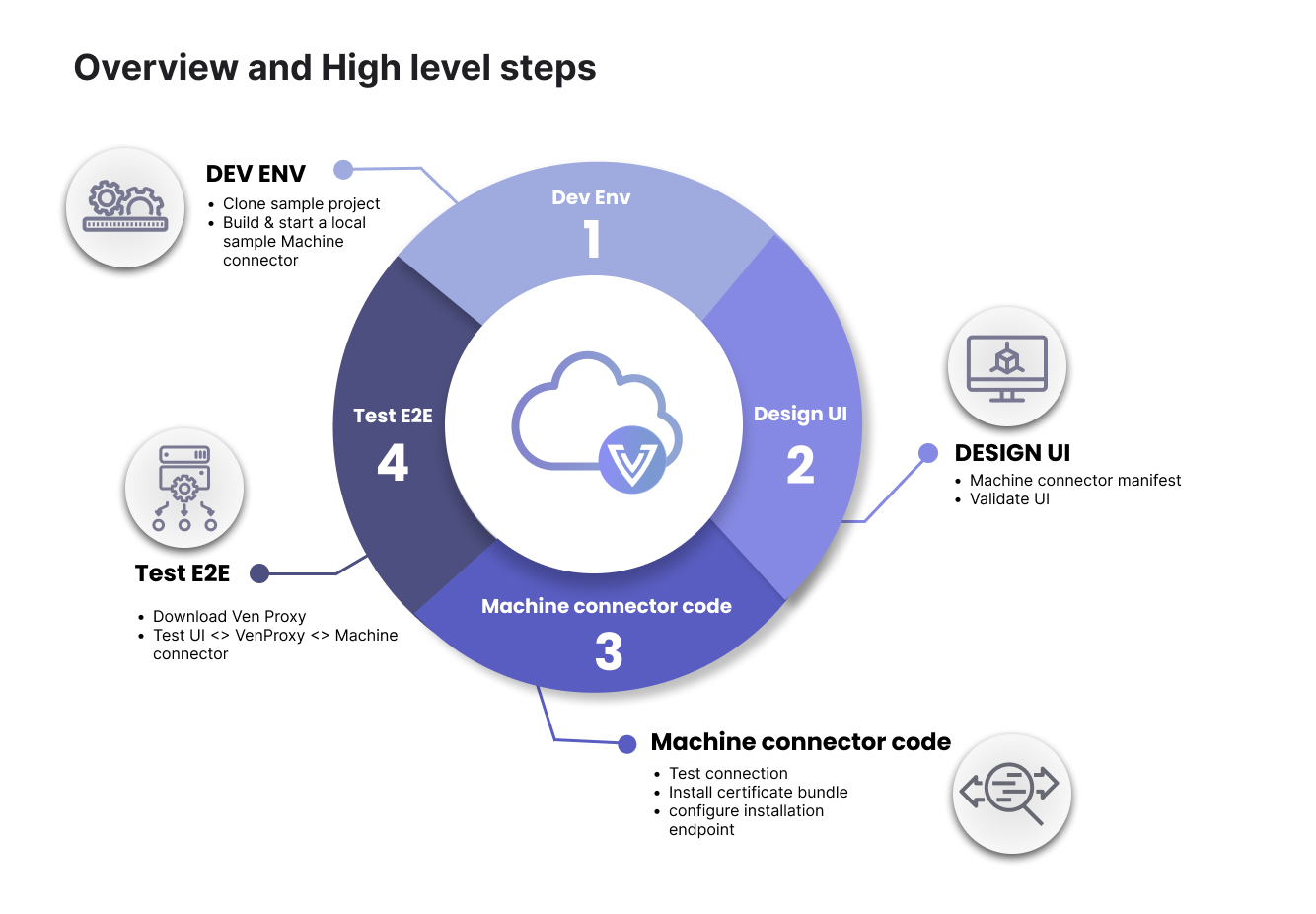
-
Set up your developer environment. You have to options in this step, choose the one that fits your needs.
- Sample push connector - Download and unzip the
sample-push-connectortemplate. Here, we will walk you through building and running a local sample connector. - VMware AVI OpenSource - Clone our VMware AVI OpenSource connector. This option makes creating the manifest and the code much easier because this is a working pre-built, ready-to-go alternative that contains a manifest, source code, and makefile to create an image. The OpenSource connector provides developers with all the necessary components to construct a Docker image, ready for uploading to a container registry. From that point, developers can update the manifest to incorporate the container registry path and use it in Certificate Manager - SaaS production. Note that you will need a registry for this option.
- Sample push connector - Download and unzip the
-
Design the UI (front-end). We will provide you with a default manifest editor. This environment allows you to develop and validate your data. We also provide you with a manifest reference, which allows you to customize your manifest to fit your needs.
-
Build connector code (back-end). Create the web-service back-end connector code using the files from the
sample-push-connectortemplate. The two files you will use are:-
main.go - this file contains a declaration of the 3 APIs we will use.
-
handlers.go - this file contains the functions which implement these APIs. This is where we will define all the logic (e.g., how we connect to the server, how to install the certificate bundle, etc.).
Again, as an alternative, you can also use our VMware AVI OpenSource connector in this step rather than the
sample-push-connectortemplate. -
-
Test E2E. Test end to end via the manifest editor and the VenProxy simulation utility. The VenProxy simulation utility creates the bridge from the simulation environment to your locally connected developer environment. This is where we will validate that your front-end UI on the manifest editor is connected via the VenProxy simulator to your back-end connector code.
Step 1: Set up your developer environment
Again, you have two options for this step. Use the sample-push-connector template, which is more of a manual hands-on approach to building your connector, or use the VMware AVI OpenSource pre-built, ready-to-go connector, saving significant time.
Sample push connector option
For this walk-thru, we will provide you with a sample-push-connector template that you can use to add more logic and customize it to fit your environment.
- Download and unzip the
sample-push-connectortemplate.
Compile the sample-push-connector template.
-
Change the working directory to where the
sample-push-connectoris located. -
Run the
buildcommand and then run thesample-push-connector. That should start your connector on port 8080.
$ go build
go: downloading go.uber.org/zap v1.21.0
go: downloading github.com/labstack/echo/v4 v4.6.1
go: downloading gopkg.in/square/go-jose.v2 v2.6.0
go: downloading golang.org/x/crypto v0.0.0-20210817164053-32db794688a5
go: downloading go.uber.org/atomic v1.7.0
go: downloading go.uber.org/multierr v1.6.0
go: downloading golang.org/x/net v0.0.0-20210913180222-943fd674d43e
go: downloading github.com/labstack/gommon v0.3.0
go: downloading github.com/mattn/go-colorable v0.1.8
go: downloading github.com/valyala/fasttemplate v1.2.1
go: downloading github.com/mattn/go-isatty v0.0.14
go: downloading golang.org/x/sys v0.0.0-20210910150752-751e447fb3d0
go: downloading github.com/valyala/bytebufferpool v1.0.0
go: downloading golang.org/x/text v0.3.7


$ ./sample-connector
{"level":"info","time":"2022-12-02T10:59:45-07:00","caller":"sample-push-connector/main.go:35","msg":"Sample Connector Starting"}
{"level":"error","time":"2022-12-02T10:59:45-07:00","caller":"sample-push-connector/main.go:77","msg":"payload encryption key not found or readable","error":"open /keys/payload-encryption-key.pem: no such file or directory","stacktrace":"main.addPayloadEncryptionMiddleware\n\t/Users/john.dev/playground/sample-push-connector/main.go:77\nmain.main\n\t/Users/john.dev/playground/sample-push-connector/main.go:44\nruntime.main\n\t/usr/local/go/src/runtime/proc.go:250"}

   ____    __
  / __/___/ /  ___
 / _// __/ _ \/ _ \
/___/\__/_//_/\___/ v4.6.1
High performance, minimalist Go web framework
https://echo.labstack.com
____________________________________O/_______
                                    O\
⇨ http server started on [::]:8080
C:\Users\john.dev\OneDrive - VENAFI\Venafi\Codez\DevHub\sample-push-connector> go build
go: downloading go.uber.org/zap v1.21.0
go: downloading github.com/labstack/echo/v4 v4.6.1
go: downloading gopkg.in/square/go-jose.v2 v2.6.0
go: downloading golang.org/x/crypto v0.0.0-20210817164053-32db794688a5
go: downloading go.uber.org/atomic v1.7.0
go: downloading go.uber.org/multierr v1.6.0
go: downloading golang.org/x/net v0.0.0-20210913180222-943fd674d43e
go: downloading github.com/labstack/gommon v0.3.0
go: downloading github.com/mattn/go-colorable v0.1.8
go: downloading github.com/valyala/fasttemplate v1.2.1
go: downloading github.com/mattn/go-isatty v0.0.14
go: downloading golang.org/x/sys v0.0.0-20210910150752-751e447fb3d0
go: downloading github.com/valyala/bytebufferpool v1.0.0
go: downloading golang.org/x/text v0.3.7


C:\Users\john.dev\OneDrive - VENAFI\Venafi\Codez\DevHub\sample-push-connector> .\sample-connector.exe
{"level":"info","time":"2023-03-02T10:52:31-05:00","caller":"sample-push-connector/main.go:35","msg":"Sample Connector Starting"}
{"level":"error","time":"2023-03-02T10:52:31-05:00","caller":"sample-push-connector/main.go:77","msg":"payload encryption key not found or readable","error":"open /keys/payload-encryption-key.pem: The system cannot find the path specified.","stacktrace":"main.addPayloadEncryptionMiddleware\n\tC:/Users/john.dev/OneDrive - VENAFI/Venafi/Codez/DevHub/sample-push-connector/main.go:77\nmain.main\n\tC:/Users/john.dev/OneDrive - VENAFI/Venafi/Codez/DevHub/sample-push-connector/main.go:44\nruntime.main\n\tC:/Program Files/Go/src/runtime/proc.go:250"}

   ____    __
  / __/___/ /  ___
 / _// __/ _ \/ _ \
/___/\__/_//_/\___/ v4.6.1
High performance, minimalist Go web framework
https://echo.labstack.com
____________________________________O/_______
                                    O\
⇨ http server started on [::]:8080
VMware AVI OpenSource option
If you choose to use our VMware AVI OpenSource connector, you will need to set up a container registry. A container registry is a repository or collection of repositories, used to store and access container images. Container registries can connect directly to container orchestration platforms such as Docker and Kubernetes.
ℹ️ Info
- Container repository - storage for your containerized application images.
- Container registry - acts as both a collection of container repositories and a searchable catalogue where you manage and deploy images.
There are many container registries on the market, some notable ones are Docker Hub, Amazon ECR, Azure Container Registry, JFrog Container Registry, etc.
Dependencies
You will need the below dependencies to use this option:
- GNU Make 3.81
- jq - commandline JSON processor [version 1.6]
- go version go1.20
- Docker version 24.0.7
- golangci-lint has version 1.52.2
Setting up environment variables
To build an image that will be run within a Venafi Satellite for provision and/or discovery operations you will need to define a CONTAINER_REGISTRY environment variable.
export CONTAINER_REGISTRY=company.jfrog.io/connectors/vmware
Step 2: Design the UI (front-end)
You will create the front-end UI using the manifest editor. As you build out your manifest, you can validate your data. See the below example:
📘 Note
You will notice a "Login" button in the top right-hand corner. At this point, you do not need to login to start creating your manifest. Instead, you can begin to create your manifest, reset it if necessary, and edit it until you are happy with it. However, you must log in with your Venafi credentials when you are ready for end-to-end testing in step four.
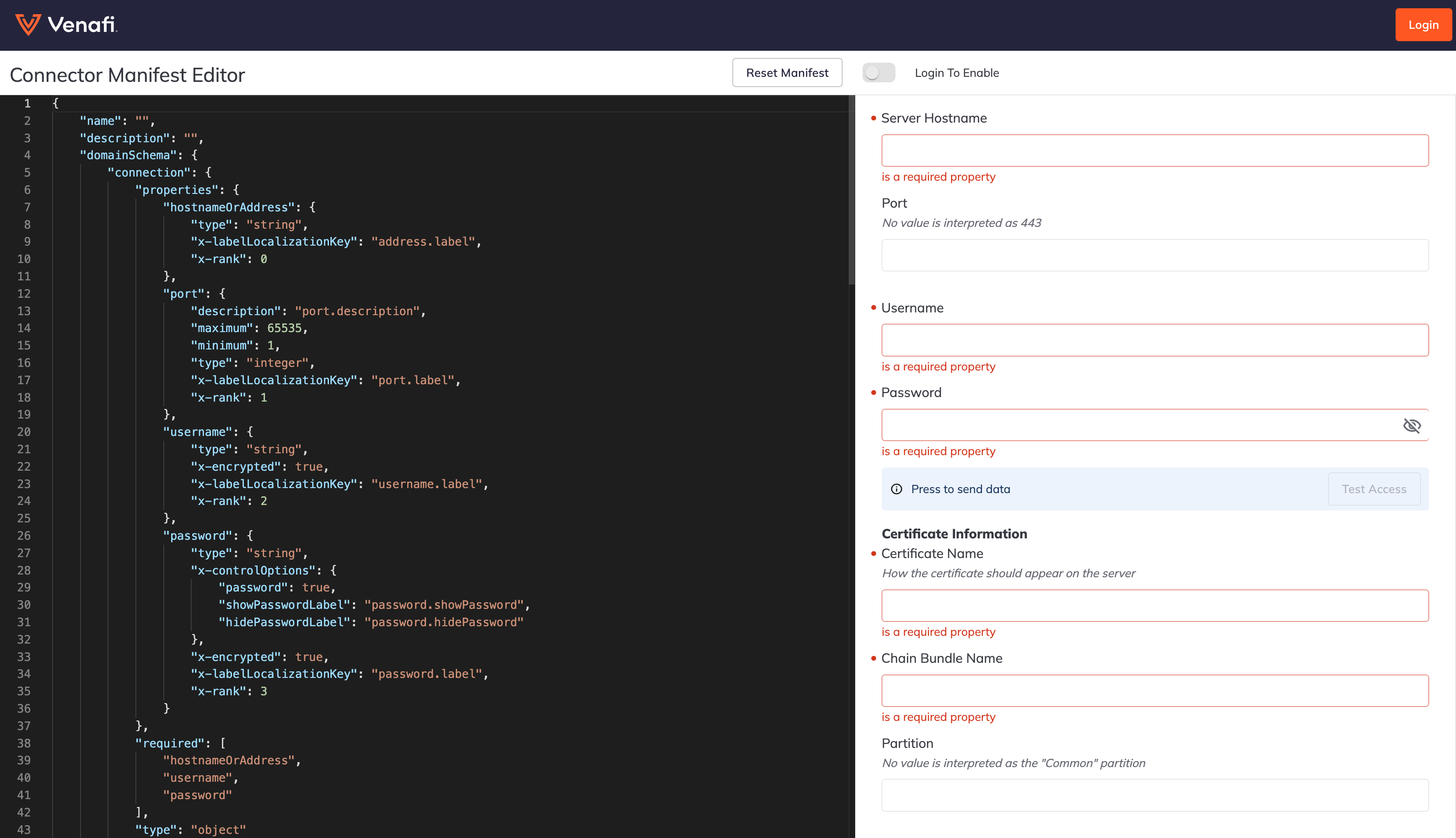
- Build out your manifest using the JSON form. This manifest will dictate how your front-end UI will look. Use the left pane to change anything needed for your specific environment, and the results will be dynamically populated in the right pane of the editor. You can use the manifest reference to customize the UI based on your specific needs.
✅ Tip
If you make a mistake and want to start over, just click the button on the top of the screen, "RESET MANIFEST."
🚧 Warning
Once you are happy with your UI, remember to make a copy and save it locally. Your session will not be saved on the manifest editor.
Step 3: Build connector code (back-end)
- Create your web-service back-end connector code using the files from the
sample-push-connectortemplate. There you will find two files (main.go and handlers.go).
The main.go file contains a declaration of 4 APIs we will be using:
ℹ️ APIs
/v1/testconnection- This API takes the connection details and responds back with a success or failure connection to the system we are building a connection for./v1/installcertificatebundle- This API takes the certificate bundle, connection details, and target information (key store) on where the certificate bundle needs to be installed. A handler must be defined to provide business logic on how to install a certificate bundle to the external system./v1/configureinstallationendpoint- This API takes the connection details, endpoint details, and the JSON returned frominstallcertificatebundleand configures it. If the install command returns a 200 and a body such as{"mydetail":{"installed_certificate_id":23546324}}then the JSON sent toconfigureinstallationendpointwill contain the VaaS supplied data from the UI for "connection" and "binding" (e.g., endpoint fields from the UI) as well as "mydetail". In this example you would see{"connection"{...},"binding":{...},"mydetail":{"installed_certificate_id":23546324}}./v1/discovercertificates- This API is recommended and indicates that your connector supports certificate discovery.
The handlers.go file is where we will define all the logic. Here you will determine how we connect to the server, how to install the certificate bundle, and how to configure the endpoint with the previously installed certificate. This file contains 4 functions where we will define the logic:
ℹ️ Functions
handleTestConnection- This is where you will write the logic to connect to the server.handleInstallCertificateBundle- This is where you write the logic to install the certificate bundle.handleConfigureInstallationEndpoint- This is where you write the logic to configure the endpoint with the certificate previously installed.handleDiscoverCertificates- This is where you write the logic to configure the endpoint for certificate discovery.
Step 4: Test E2E
Once you complete your front-end UI manifest and back-end connector code, you are ready to validate with end-to-end testing.
- In the manifest editor, click the login button, and enter your Venafi credentials. Now toggle the simulator button, and this will create a unique simulator session token ID and create a dedicated back-end simulator. Copy this token ID and save it for later.
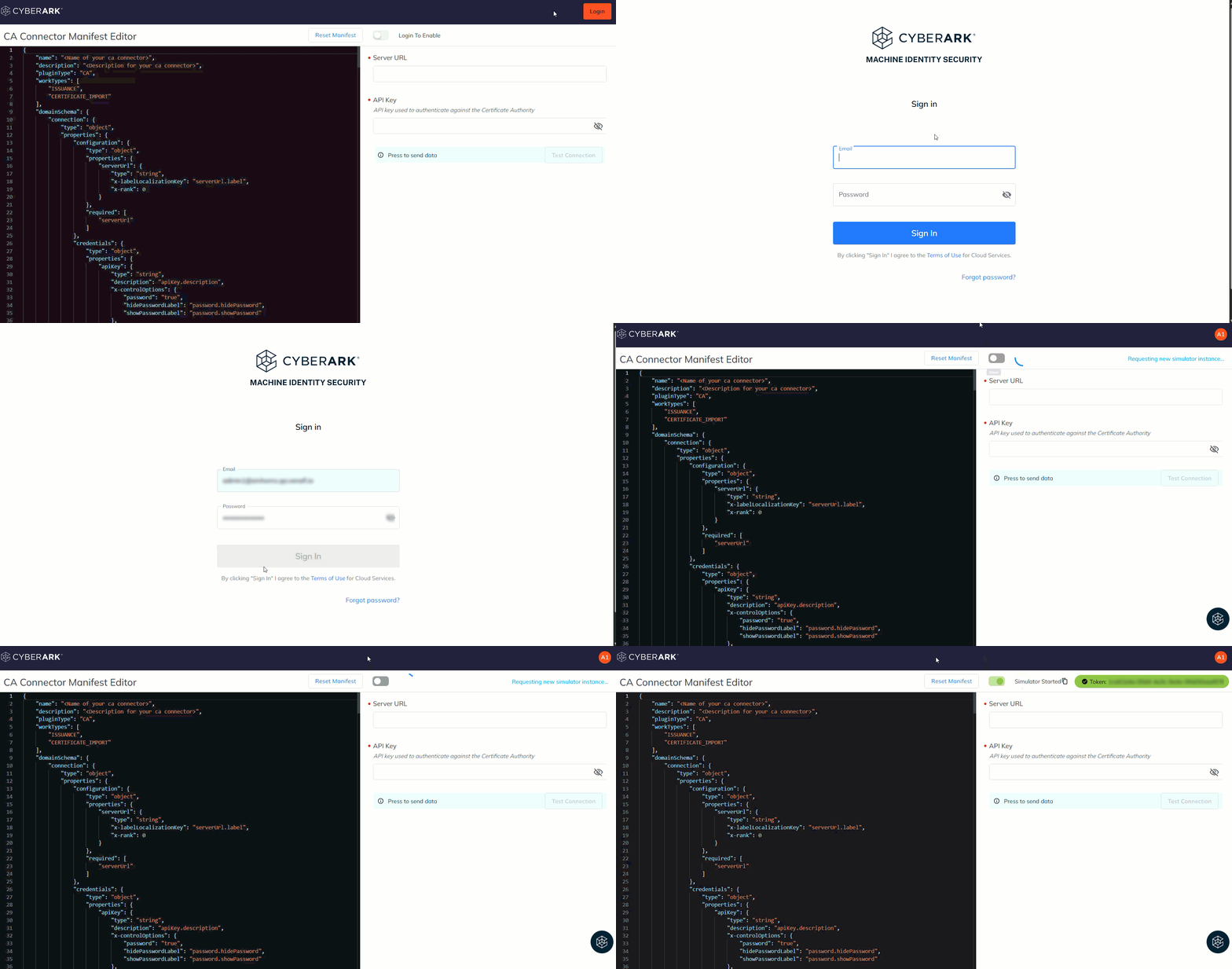
-
Download and unzip the VenProxy simulation utility. VenProxy creates the bridge from the simulation environment to your locally connected developer environment.
-
Run the VenProxy simulation utility and enter your token ID saved from the previous step when prompted. The simulator should now be connected to your local environment. To verify, go back to your VenProxy, and you will see that the front-end UI is connected to VenProxy and is talking to the web server on port 8080.
 $ ./VenProxy
Enter the simulation session token:
e92336ac-f37b-4077-9010-e82b3a6f1ae3
- Go back to the manifest editor and test access. Fill out the required fields and click on the “Test Access” button. You should see a successful connection noted by the “true“ response below.
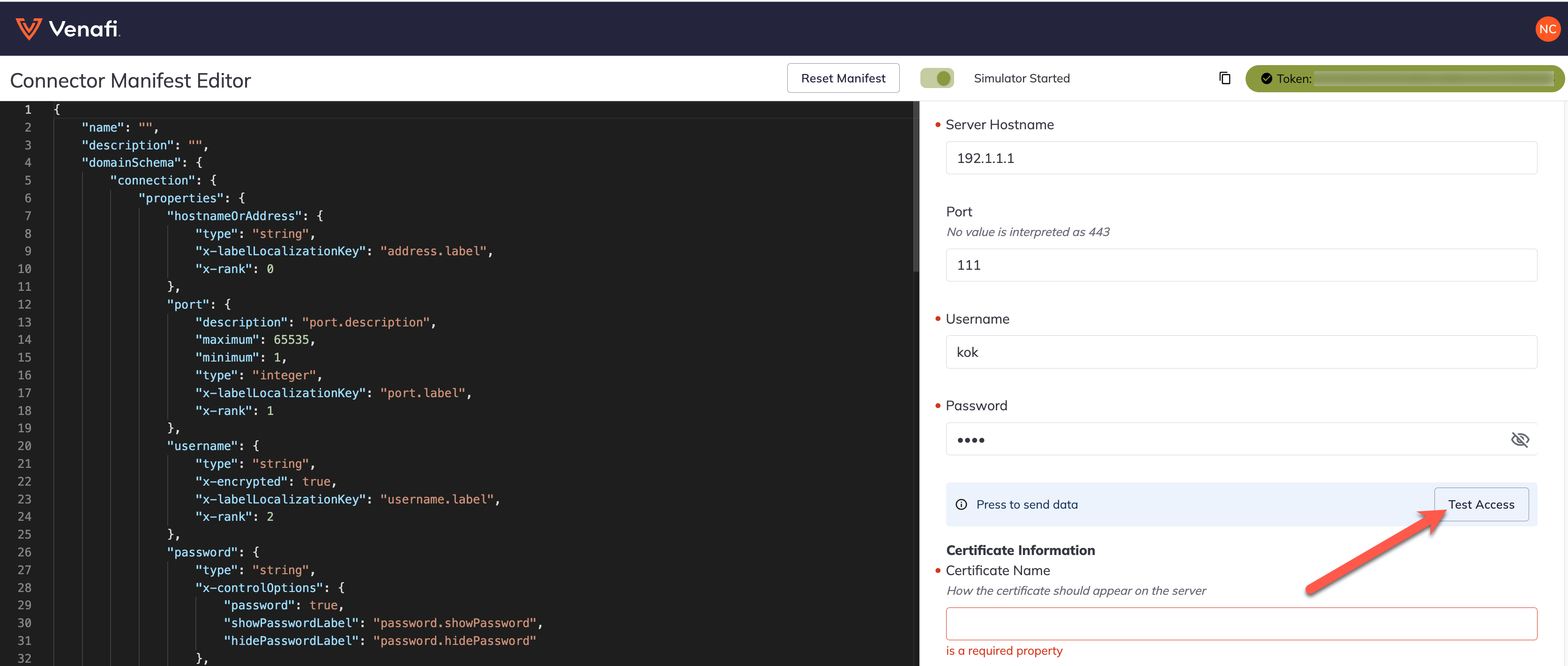
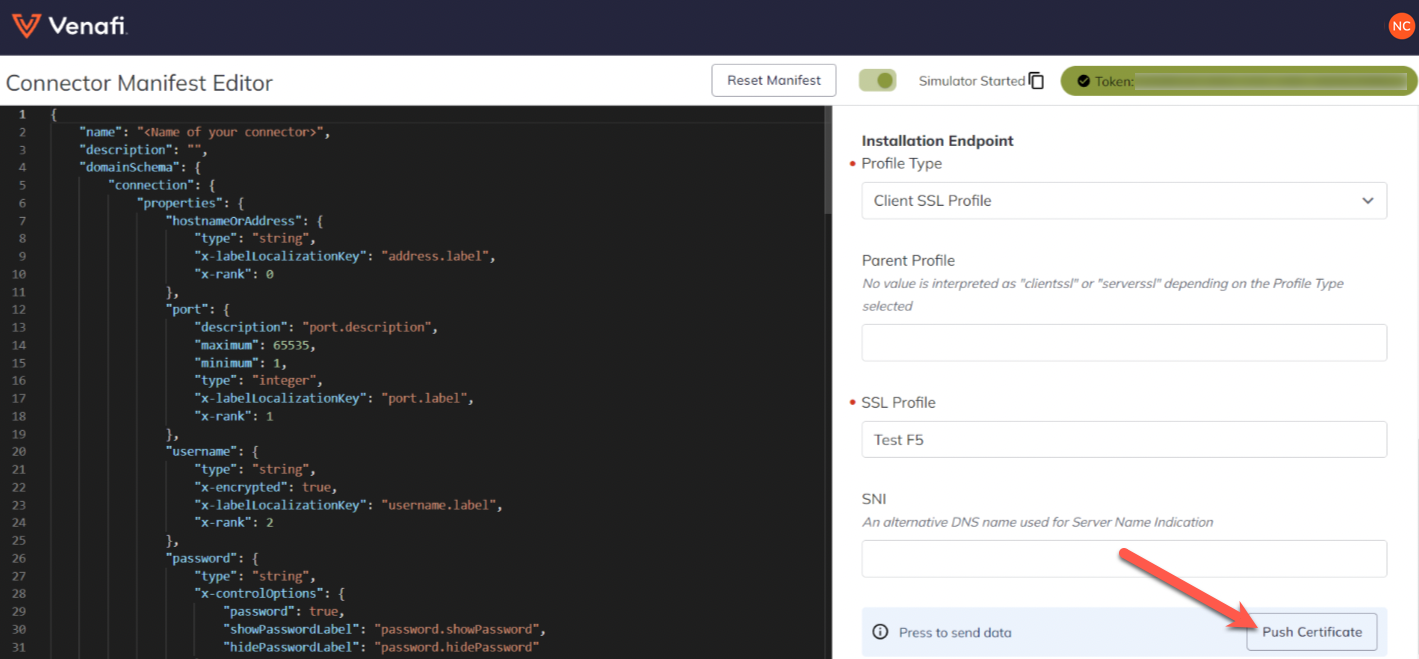
- Push your first certificate. At this point, you can now push certificates. Fill out the required fields under "Certificate Information" and click on the "Push Certificate" button. You should see a successful push of the certificate, noted by the "true "response below.
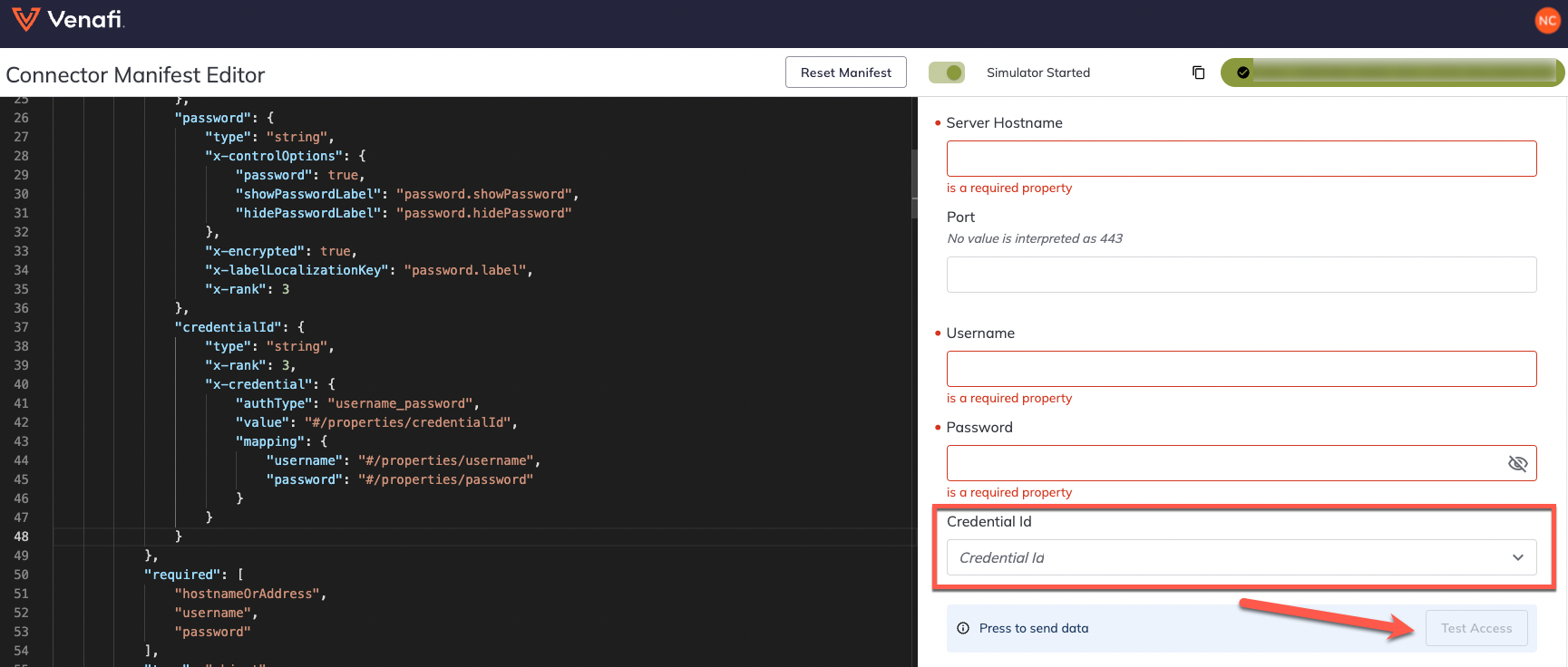
- (Recommended) If you want your connector to support shared credentials from CyberArk, from the "Credential ID" drop-down, select your shared credential. At this point Venafi will issue you a randomly generated credential which will be sent to the back-end. This credential will be "first.last" and "password". You will need to change these values in the debugger tool to your desired username and password in order to see a successful connection. Click on the “Test Access” button. You should see a successful connection in the front-end noted by the "true "response below.
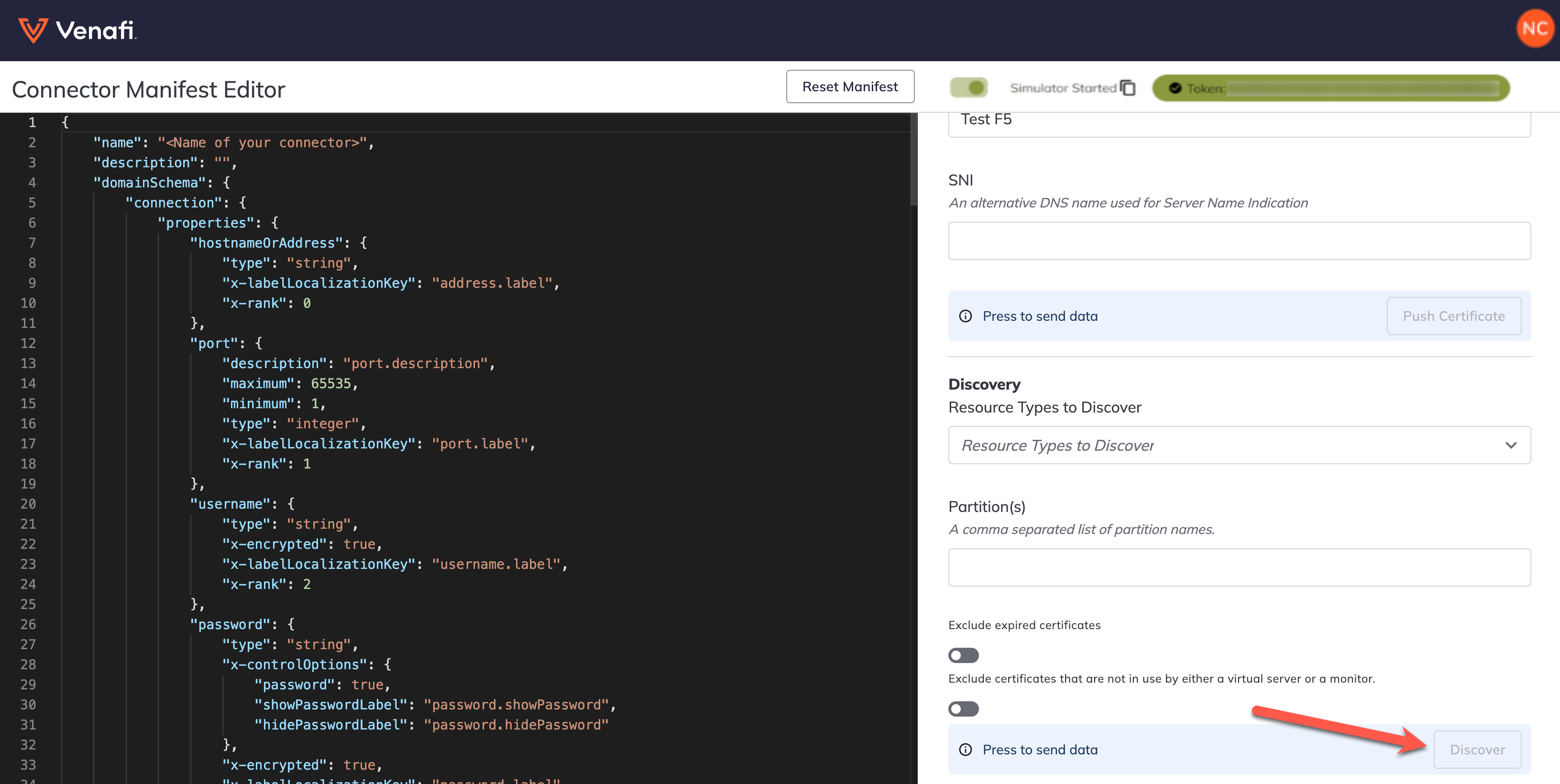
- (Recommended) If you want your connector to support certificate discovery, fill out the required fields under "Discovery" and click the "Discover" button. You should see a successful discovery, noted by the "Completed successfully" response below.
🥇 Congrats, you have built your own connector! Now that you have completed this, do you want to take the next step and learn about our Connector program for Certificate Manager - SaaS?
CyberArk shared credentials (recommended)
As noted in the above documentation, there is an option to have your connector support CyberArk shared credentials. Adding this option will enable shared credential capabilities in the user interfaces. If this option is chosen, you will need to add the below to the connection property.
{
"credentialId": {
  "type": "string",
  "x-rank": 3,
  "x-credential": {
    "authType": "username_password",
    "value": "#/properties/credentialId",
    "mapping": {
       "username": "#/username",
       "password": "#/password"
     }
   }
  }
}
Certificate discovery (recommended)
As noted in the above documentation, there is an option to have your connector support certificate discovery. Adding this option will enable discovery capabilities in the user interfaces. If this option is chosen, use the below example to understand what the response should look like.
The discoveryPage property
The response object may include a discoveryPage property. In this example, we see that the response object indicates that discoveryPage was not included; therefore, this signifies the end of the discovery.
 {
    "discoveryPage": null,
 }
The messages object definition
The response object must have an array property named messages. Each item within the messages array signifies the discovery of a single certificate, along with its corresponding certificate chain (if it exists) and the machine identities utilizing that certificate. The definition of messages is:
| Property name | Type | Required /Optional | Description |
|---|---|---|---|
| certificate | string | Required | This property must be supplied as an X509 certificate in Base64 PEM format. |
| certificateChain | string | Optional | The property is one string per certificate in the chain. |
| machineIdentities | object | Required | This property may contain one or more entities -- if no machine identities reference the certificate, then the certificate must not be included in the discovery results). |
| certificateChain | string | Optional | The property is one string per certificate in the chain. |
The machineIdentity object definition
keystore- Please ensure that your manifest includes only the properties defined and all the required keystore properties.binding- Please ensure that your manifest includes only the properties defined and all the required binding properties.
The following is an example of this section:
{
  "messages": [
    {
      "certificate": "-----BEGIN CERTIFICATE-----\n ... \n-----END CERTIFICATE-----\n",
      "certificateChain": [
        "-----BEGIN CERTIFICATE-----\n ... \n-----END CERTIFICATE-----\n"
      ],
      "machineIdentities": [
        {
          "keystore": {
            "partition": "AS3_auto_monitor",
            "certificateName": "A1/062123050649139.qa.vfidev.com-19Jun25-78F4",
            "chainName": "A1/chain_062123050649139"
          },
          "binding": {
            "sslProfile": "as3_monitor",
            "parentProfile": "",
            "sslProfileType": "server",
            "serverName": ""
          }
        }
      ]
    },
    {
      "certificate": "-----BEGIN CERTIFICATE-----\n ... different certificate ... -----END CERTIFICATE-----\n",
      "certificateChain": [
        "-----BEGIN CERTIFICATE----- ... -----END CERTIFICATE-----\n"
      ],
      "installations": [],
      "machineIdentities": [
        {
          "keystore": {
            "partition": "Common",
            "certificateName": "061823060635455.qa.vfidev.com-RGEN-23Jun17-230351",
            "chainName": "chain_061823060635455"
          },
          "binding": {
            "sslProfile": "serverssl_hotel",
            "parentProfile": "",
            "sslProfileType": "server",
            "serverName": ""
          }
        }
      ]
    }
  ]
}
The basic definition of a discoveryResponse is:
{
  "discoveryPage": (see existing documentation)
  "messages": [], (a collection of machine identity messages)
}
The basic definition of a machine identity in that response is:
{
  "keystore":{} (only the properties defined in your manifest AND all of the required keystore properties must be included)
  "binding": {} (only the properties defined in your manifest AND all of the required binding properties must be included)
}
Connector program for Certificate Manager - SaaS
See the below to develop your connector alongside Venafi. This will ensure a fast publication of your connector!
📘 Note
The connector program for Certificate Manager - SaaS is evolving, so some specifics about the following requirements are subject to change.
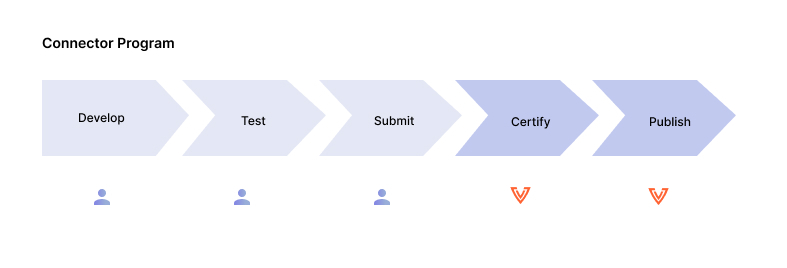
-
Develop (Developer owned) - Develop connector using included resources.
-
Test (Developer owned) – Test the connector code and validate the required application functions.
-
Submit (Developer owned) – Submit the connector code to Venafi.
-
Certify (Venafi owned) - Venafi will certify the connector and provide any feedback.
-
Publish to production (Venafi owned) – Venafi will publish the connector to production.
Submit Your Solution
Once your connector has been built and tested internally by your team, you are now ready to submit your solution to Venafi for certification! We ask that you submit any accompanying documentation and a short video demo walking through each supported function of your solution.
Manifest reference
The manifest is a JSON file in your connector project. It contains certain information about your connector that is required to deploy and use your connector in the Certificate Manager - SaaS.
Your manifest should contain the following information:
📘 Info
The following property key names cannot be modified. However, you can add new property keys/values and edit as needed.
The top layer property
| Property name | Type | Required /Optional | Description |
|---|---|---|---|
| name | string | Required | Name of the new connecter. Displayed in the UI. |
| description | string | Optional | Description of your machine. Currently not displayed in the UI. |
| deployment | object | Required | List the location of your image/binary. |
| image | string | Required | The location of the final product (e.g., binary). The location of where Certificate Manager - SaaS can send the image to the VSatellite, in order to download and run it. |
The following is an example of this section of the manifest:
  "name": " your choice",
  "description": "",
  "workType": "",
  "deployment": {
    "image": "docker.io/hello-connector:latest",
}
📘 Info
The domainSchema is the container object that holds the binding, connection, and keystore object definitions.
The binding property
| Property name | Type | Required /Optional | Description |
|---|---|---|---|
| binding | object | Required | The fields used while provisioning a certificate. Describes how a certificate/key and chain are used. Visible in the UI (in the provisioning pop-up) under "Installation Endpoint." |
| oneOf | array of objects | Optional | The property must be present to create a drop-down list of options. |
| const | string | Required | Applied when creating a drop-down property (e.g., “oneOf”), the value of “const” is used to indicate that value for one of the drop-down selection choices. This is required for a definition of “oneOf.” Additionally, the text displayed in the UI for a “oneOf” choice is defined using “title” and is also required. |
| x-labelLocalizationKey | string | optional | The key/value used to identify the text shown in the UI. The value is the path to the localization text for each language defined in the localization resources. The value is a dotted path, for example, "username.label". |
| x-rank | integer | Optional | Determines the rank order in the UI. The value is used to force layout/ordering. |
| x-rule | object | Optional | An optional definition that is used to create a relationship between property names. |
| effect | string | Optional | A required field when defining a rule using x-rule. |
| condition | object | Required - when defining a rule. | A required part of an “x-rule” definition. This is an object containing “scope” and “schema.” |
| scope | string | Required - when defining a rule. | A required part of an “x-rule” definition. The value is a path from the root of the JSON object to the associated property name. |
| schema | object | Optional | Required for a definition of "x-rule." The content field "const" will match the "const" value declared in the associated property definition. For example, when using "oneOf," two choices are defined in the other property (in the example, client or server). Their "const" values are "client" or "server," so the value would also be either "client" or "server". This tells the UI that if the user selects either client or server and the const value in this property matches one of those, the rule will be enforced. |
| type | object | Required | For binding, this must be the value of "object." |
| x-primaryKey | string | Optional | Used to create a unique machine identity, by taking the value of the sslProfileType and the sslProfile and combining the two to create a unique identification key. This property is optional if there are no binding properties, otherwise it is required. |
📘 Note
The
x-primaryKeyis optional and can be a string, an array, or an object. In case it's an object, we support a discriminator object or OneOf object.
An example of a OneOf object would be the following:
{
"x-primaryKey": {
        "oneOf": [
          "#/pem/paths/certificate",
          "#/pem/paths/certificateChain",
          "#/jks/path",
          "#/pkcs12/path"
        ]
  }
}
An example of a discriminator object would be the following:
{
"x-primaryKey": {
        "discriminator": {
          "propertyName": "#/type",
          "mapping": {
            "pem": [
              "#/pem/paths/certificate",
              "#/pem/paths/certificateChain"
            ],
            "jks": "#/jks/path",
            "pkcs12": "#/pkcs12/path"
          }
        }
    }
}
The following is an example of this section of the manifest:
{
 "domainSchema": {
    "binding": {
      "properties": {
        "sslProfileType": {
          "oneOf": [
            {
              "const": "client",
              "x-labelLocalizationKey": "sslProfileType.client"
            },
            {
              "const": "server",
              "x-labelLocalizationKey": "sslProfileType.server"
            }
          ],
          "x-labelLocalizationKey": "sslProfileType.label",
          "x-rank": 0
        },
        "parentProfile": {
          "description": "parentProfile.description",
          "type": "string",
          "x-labelLocalizationKey": "parentProfile.label",
          "x-rank": 1
        },
        "sslProfile": {
          "type": "string",
          "x-labelLocalizationKey": "sslProfile.label",
          "x-rank": 2
        },
        "serverName": {
          "description": "serverName.description",
          "format": "hostname",
          "type": "string",
          "x-labelLocalizationKey": "serverName.label",
          "x-rank": 3,
          "x-rule": {
            "effect": "SHOW",
            "condition": {
              "scope": "#/properties/sslProfileType",
              "schema": {
                "const": "client"
              }
            }
          }
        }
      },
      "required": [
        "sslProfile",
        "sslProfileType"
      ],
      "type": "object",
      "x-labelLocalizationKey": "binding.label",
      "x-primaryKey": [
        "#/sslProfileType",
        "#/sslProfile"
      ]
    }
  }
}
The connection property
| Property name | Type | Required /Optional | Description |
|---|---|---|---|
| properties | object | Required | Describes the desired input controls that are displayed in the UI. |
| x-labelLocalizationKey | string | Required | The key/value used to identify the text shown in the UI. The value is the path to the localization text for each language defined in the localization resources. The value is a dotted path, for example, "address.label". |
| x-rank | integer | Optional | Determines the rank order in the UI. The value is used to force layout/ordering. |
| description | string | Optional | Provides description of port and displays helper text (hints) in the UI. |
| maximum/minimum | integer | Optional | Provide specific values used in the UI to enforce validation (e.g., "maximum": 65535). |
| x-encrypted | boolean | Optional | Encrypts the data sent from the Certificate Manager - SaaS UI session to Certificate Manager - SaaS. The encrypted data can only be decrypted by a vSatellite. |
| x-controlOptions | object | Optional | Contains Certificate Manager - SaaS specific options used to enhance the UI layout. |
| password | boolean | Optional - Optional within “x-controlOptions” | Provides the option to hide or show password text. When the value is set to "true," the UI will not display the typed text. |
| showPasswordLabel | string | Optional | Displays additional input icons to show or hide the password. A part of the “x-controlOptions” definition and required when the corresponding “password” field is true. |
| hidePasswordLabel | string | Optional | Displays the hover text for the password. A part of the “x-controlOptions” definition and required when the corresponding “password” field is true. |
| x-encrypted | boolean | Required | The best practice is to set encryption to "true" for all password fields. |
| authType | string | Required | Required property when using X-credential. This tells the framework what type of credential we are using for the machine. Currently, we have two types of credentials, "username" and "password", these are the only values this field can have. |
| value | string | Required | Required property when using X-credential. This property tells the framework where the selected credential id will be stored in the manifest. |
| mapping | object | Required | Required property when using X-credential. This property tells the framework where the selected credential's username and password values will be stored. |
| username | string | Required | Required for the mapping property. This property is only required if the authType is "username_password." |
| password | string | Required | Required for the mapping property. |
| required | array | Optional | The UI uses these names to identify required input fields. If present, the strings listed must match the "properties" named fields. |
| type | object | Required | For "connection," this must be the value of "object." |
📘 Note
The
x-credentialis optional. Any field that contains the propertyx-credentialand has a type of "string" becomes a shared password dropdown field. If you choose this option, add the following example to the connection property in the manifest:
{
"credentialId": {
  "type": "string",
  "x-rank": 3,
  "x-credential": {
    "authType": "username_password",
    "value": "#/properties/credentialId",
    "mapping": {
       "username": "#/username",
       "password": "#/password"
     }
   }
  }
}
The following is an example of this section of the manifest:
{
  "connection": {
      "properties": {
        "hostnameOrAddress": {
          "type": "string",
          "x-labelLocalizationKey": "address.label",
          "x-rank": 0
        },
        "port": {
          "description": "port.description",
          "maximum": 65535,
          "minimum": 1,
          "type": "integer",
          "x-labelLocalizationKey": "port.label",
          "x-rank": 1
        },
        "username": {
          "type": "string",
          "x-encrypted": true,
          "x-labelLocalizationKey": "username.label",
          "x-rank": 2
        },
        "password": {
          "type": "string",
          "x-controlOptions": {
            "password": true,
            "showPasswordLabel": "password.showPassword",
            "hidePasswordLabel": "password.hidePassword"
          },
          "x-encrypted": true,
          "x-labelLocalizationKey": "password.label",
          "x-rank": 3
        }
      },
      "required": [
        "hostnameOrAddress",
        "username",
        "password"
      ],
      "type": "object"
    }
}
The discovery property (recommended)
Add this property to the domainSchema if you want your connector to support certificate discovery.
| Property name | Type | Required /Optional | Description |
|---|---|---|---|
| discovery | object | Required | Add this definition to apply filter controls to your manifest. If your discovery requires optional configuration, use this to minimize and filter the results. By default, your connector returns all results. |
| properties | object | Required | Describes the desired input controls displayed in the UI. |
| discoveryType | object | Optional | Determines whether to include all types, only monitors, or only virtual servers. |
| oneOf | array of objects | Optional | The property must be present to create a drop-down list of options. |
| type | object | Required | For discovery, this must be the value of "object." |
The following is an example of this section of the manifest:
{
  "discovery": {
    "properties": {
      "discoveryType": {
        "oneOf": [
          {
            "const": "all",
            "x-labelLocalizationKey": "discoveryType.all"
          },
          {
            "const": "monitor",
            "x-labelLocalizationKey": "discoveryType.monitor"
          },
          {
            "const": "virtualServer",
            "x-labelLocalizationKey": "discoveryType.virtualServer"
          }
        ],
        "x-labelLocalizationKey": "discoveryType.label",
        "x-rank": 0
      },
      "excludeExpiredCertificates": {
        "type": "boolean",
        "x-labelLocalizationKey": "discovery.expiredCertificatesLabel",
        "x-rank": 2
      },
      "excludeInactiveProfiles": {
        "type": "boolean",
        "x-labelLocalizationKey": "discovery.inactiveProfilesLabel",
        "x-rank": 3
      },
      "partition": {
        "default": "Common",
        "description": "discovery.partitionDescription",
        "maxLength": 64,
        "type": "string",
        "x-labelLocalizationKey": "discovery.partitionLabel",
        "x-rank": 1
      }
    },
    "type": "object"
  }
}
The above example shows custom properties for a F5 machine:
| Property name | Type | Required /Optional | Description |
|---|---|---|---|
| excludeExpiredCertificates | boolean | Optional | Provides the option to exclude expired certificates in the discovery. When the value is set to "true" and passed to the connector, the discovery results will exclude expired certificates. Otherwise, the discovery results will include expired certificates. |
| excludeInactiveProfiles | boolean | Optional | Provides the option to exclude inactive profiles in the discovery. When the value is set to "true" and passed to the connector, the discovery results exclude profiles not in use by either a monitor or a virtual server. Otherwise, the discovery results include profiles not in use by either a monitor or virtual server. |
| partition | object | Optional | Allow the user to specify one or more partition names, which will be passed to the connector for identifying the exclusive list of partition names to be scanned during the discovery process. |
The discoveryControl property (recommended)
Add this property to the domainSchema if you want your connector to support certificate discovery.
| Property name | Type | Required /Optional | Description |
|---|---|---|---|
| discoveryControl | object | Required | This definition is provided by Venafi in order for your manifest to support certificate discovery. This will tell you what the maximum number of results are that you can return for each page. |
| properties | object | Required | Describes the desired input controls displayed in the UI. |
| maxResults | object | Required | Indicates the maximum number of certificates that should be returned per page of discovery results. Note that this count only applies to the certificates and not to the number of machine identities found referencing those certificates. |
| type | integer | Required | Indicates the maxResults property data type. |
| required | object | Required | The UI uses these names to identify required input fields. If present, the strings listed must match the "properties" named fields. |
| type | object | Required | For discoveryControl, this must be the value of "object." |
The following is an example of this section of the manifest:
 {
   "discoveryControl": {
      "properties": {
        "maxResults": {
          "type": "int"
        }
      },
      "required": [
        "maxResults"
      ],
      "type": "object"
    }
 }
The discoveryPage property (recommended)
Add this property to the domainSchema if you want your connector to support certificate discovery.
📘 Note
The discoveryType and/or pagination must be included to initiate a subsequent discovery continuation request. If neither has a value, the discoveryPage will be considered empty, and the discovery will be considered complete. Also if including a discoveryPage as an option, please adhere to the required/optional fields below for inclusion in the manifest.
| Property name | Type | Required /Optional | Description |
|---|---|---|---|
| discoveryPage | Object | Optional | The property defines two parameters to indicate that the response should initiate a subsequent request. The new request will include a discoveryPage object. A connector can include a discoveryPage object to pass data from a response to the next request to support pagination. If no discoveryPage object is included in a response, the discovery process is considered complete. |
| properties | object | Required | Describes the desired input controls displayed in the UI. |
| discoveryType | string | Required | This is a returned variable that helps the connector resume from the last point when called again. This is essential as the machine might have more data than the connector can return (e.g., due to "maxResults" limitations) and because the connector is stateless. The connector can use this option to pass any string value in a discovery response that will be included in the subsequent discovery continuation request. |
| paginator | string | Required | This is a returned variable that helps the connector resume from the last point when called again. This is essential as the machine might have more data than the connector can return (e.g., due to "maxResults" limitations) and because the connector is stateless. The connector can use this option to pass any string value in a discovery response that will be included in the subsequent discovery continuation request. |
| type | object | Required | For discoveryControl, this must be the value of "object." |
The following is an example of this section of the manifest:
{
  "discoveryPage": {
    "properties": {
      "discoveryType": {
        "type": "string"
      },
      "paginator": {
        "type": "string"
      }
    },
    "type": "object"
  }
}
To learn more about the discoveryControl and discoveryPage data flow see: The discoveryControl and discoveryPage properties data flow
The keystore property
| Property name | Type | Required /Optional | Description |
|---|---|---|---|
| keystore | object | Required | The fields used while provisioning a certificate. The connector uses these fields to state WHERE to put a certificate/key and chain. Visible in the UI (in the provisioning pop-up) under "Certificate Information." |
| properties | object | Required | Describes the desired input controls displayed in the UI. |
| required | array | Optional | The UI uses these names to identify required input fields. If present, the strings listed must match the "properties" named fields. |
| type | string | Required | Used for the keystore definition, this must have a value of “object.” |
| x-primaryKey | string | Required | Used to create a unique machine identity, by taking the value of the certificateName and the partition and combining the two to create a unique identification key. |
The following is an example of this section of the manifest:
{
  "keystore": {
    "properties": {
      "certificateName": {
        "description": "certificateName.description",
        "type": "string",
        "x-labelLocalizationKey": "certificateName.label",
        "x-rank": 0
      },
      "chainName": {
        "type": "string",
        "x-labelLocalizationKey": "chainName.label",
        "x-rank": 1
      },
      "partition": {
        "description": "partition.description",
        "type": "string",
        "maxLength": 64,
        "x-labelLocalizationKey": "partition.label",
        "x-rank": 2,
        "x-targetConfigurationRef": "/partitions"
      }
    },
    "required": [
      "certificateName",
      "chainName"
    ],
    "type": "object",
    "x-labelLocalizationKey": "keystore.label",
    "x-primaryKey": [
      "#/certificateName",
      "#/partition"
    ]
  }
}
The localizationResources property
The below properties are required when they are given as values for x-labelLocalizationKey in the manifest.
| Property name | Type | Required /Optional | Description |
|---|---|---|---|
| localizationResources | object | Optional | An object containing one, or more, named language references. |
| en | object | required | En is a language code which refers to the English language. |
| address | object | Optional | Illustrated in the below example. |
| port | object | Optional | Illustrated in the below example. |
| username | object | Optional | Illustrated in the below example. |
| password | string | Optional | Illustrated in the below example. |
| keystore | array | Optional | Illustrated in the below example. |
| binding | string | Optional | Illustrated in the below example. |
| certificateName | object | Optional | Illustrated in the below example. |
| chainName | object | Optional | Illustrated in the below example. |
| partition | object | Optional | Illustrated in the below example. |
| sslProfile | object | Optional | Illustrated in the below example. |
| parentProfile | object | Optional | Illustrated in the below example. |
| sslProfileType | object | Optional | Illustrated in the below example. |
| serverName | object | Optional | Illustrated in the below example. |
| discovery | object | Optional | Illustrated in the below example. |
| discoveryType | object | Optional | Illustrated in the below example. |
The following is an example of this section of the manifest:
{
  "localizationResources": {
    "en": {
      "address": {
        "label": "F5 BIG-IP LTM Address/Hostname"
      },
      "port": {
        "description": "No value is interpreted as 443",
        "label": "Port"
      },
      "username": {
        "label": "Username"
      },
      "password": {
        "label": "Password",
        "showPassword": "Show Password",
        "hidePassword": "Hide Password"
      },
      "keystore": {
        "label": "Certificate Information"
      },
      "binding": {
        "label": "F5 Store Details"
      },
      "certificateName": {
        "description": "How the certificate should appear on the F5 BIG-IP",
        "label": "Certificate Name"
      },
      "chainName": {
        "label": "Chain Bundle Name"
      },
      "partition": {
        "description": "No value is interpreted as the \"Common\" partition",
        "label": "Partition"
      },
      "sslProfile": {
        "label": "SSL Profile"
      },
      "parentProfile": {
        "description": "No value is interpreted as \"clientssl\" or \"serverssl\" depending on the Profile Type selected",
        "label": "Parent Profile"
      },
      "sslProfileType": {
        "label": "Profile Type",
        "client": "Client SSL Profile",
        "server": "Server SSL Profile"
      },
      "serverName": {
        "description": "An alternative DNS name used for Server Name Indication",
        "label": "SNI"
      },
       "discovery": {
        "partitionLabel": "Partition(s)",
        "partitionDescription": "A comma separated list of partition names.",
        "expiredCertificatesLabel": "Exclude expired certificates",
        "inactiveProfilesLabel": "Exclude certificates that are not in use by either a virtual server or a monitor."
      },
      "discoveryType": {
        "label": "Resource Types to Discover",
        "all": "Both Monitors and Virtual Servers",
        "monitor": "Monitors",
        "virtualServer": "Virtual Servers"
      }
    }
  }
}
The hooks property
| Property name | Type | Required /Optional | Description |
|---|---|---|---|
| hooks | object | Required | |
| mapping | object | Required | An object of key value pairs for the provisioning activity names. |
| configureInstallationEndpoint | string | Required | The URL path that is used when sending a POST to the developer's connector for configuring usage of an installed certificate. |
| discoverCertificates | string | Optional | The URL path that is used when you want to indicate that your connector supports certificate discovery. This will enable discovery features in the user interfaces. |
| getTargetConfiguration | string | Required | The path (e.g., POST endpoint) to the developer's connector for the named activity. |
| installCertificateBundle | string | Required | The URL path that is used when sending a POST to the developer's connector for installing a certificate, private key, and issuing certificate chain. |
| testConnection | string | Required | The URL path that is used when sending a POST to the developer's connector for testing connectivity between that connector and the configured target. |
The following is an example of this section of the manifest:
{
  "hooks": {
    "mapping": {
      "configureInstallationEndpoint": {
        "path": "/v1/configureinstallationendpoint",
        "request": null,
        "response": null
      },
      "discoverCertificates": {
        "path": "/v1/discovercertificates",
        "request": null,
        "response": null
      },
      "getTargetConfiguration": {
        "path": "/v1/gettargetconfiguration",
        "request": null,
        "response": null
      },
      "installCertificateBundle": {
        "path": "/v1/installcertificatebundle",
        "request": null,
        "response": null
      },
      "testConnection": {
        "path": "/v1/testconnection",
        "request": null,
        "response": null
      }
    },
    "requestConverters": [
      "arguments-decrypter"
    ]
  }
}
The discoveryControl and discoveryPage properties data flow
See the sequential calls and responses in the below example to understand the data flow of these properties. In this example, we have an Application Delivery Controller (ADC) that hosts multiple certificates organized by tenants, making pagination necessary.
-
This is the first request to
/v1/discovercertificates:{
"connection": {
"hostnameOrAddress": "xxx-xxx.company.com",
"password": "XXXXXXXXXXXXXXXX",
"port": 0,
"username": "admin"
},
"discovery": {
"tenants": "admin,apple,pear,orange",
"excludeExpiredCertificates": false,
"excludeInactiveCertificates": false
},
"discoveryControl": {
"maxResults": 21
}
}This is the first response:
{
    "discoveryPage": {
        "discoveryType": "{\"currentTenant\":\"admin\"}",
        "paginator": "{\"page\":3,\"index\":1}"
    },
    "messages": [
        {
"certificate": "-----BEGIN CERTIFICATE-----\n -
This is the second request to
/v1/discovercertificates.📘 Note
Notice that the discoveryPage object from the first response above is included in the second request below.
{
    "connection": {
        "hostnameOrAddress": "xxx-xxx.company.com",
        "password": "XXXXXXXXXXXXXXXX",
        "port": 0,
        "username": "admin"
    },
    "discovery": {
        "tenants": "admin,apple,pear,orange",
        "excludeExpiredCertificates": false,
        "excludeInactiveCertificates": false
    },
    "discoveryPage": {
        "discoveryType": "{\"currentTenant\":\"admin\"}",
        "paginator": "{\"page\":3,\"index\":1}"
    },
    "discoveryControl": {
        "maxResults": 21
    }
}
This is the second response.
{
    "discoveryPage": {
        "discoveryType": "{\"currentTenant\":\"pear\"}",
        "paginator": "{\"page\":1,\"index\":2}"
    },
    "messages": [
        {
"certificate": "-----BEGIN CERTIFICATE-----\n -
This is the third (and last) request to
/v1/discovercertificates(because the response to it has a nulldiscoveryPage).📘 Note
Notice that the discoveryPage object from the second response above is included in the third request below.
{
    "connection": {
        "hostnameOrAddress": "xxx-xxx.company.com",
        "password": "XXXXXXXXXXXXXXXX",
        "port": 0,
        "username": "admin"
    },
    "discovery": {
        "tenants": "admin,apple,pear,orange",
        "excludeExpiredCertificates": false,
        "excludeInactiveCertificates": false
    },
    "discoveryPage": {
        "discoveryType": "{\"currentTenant\":\"pear\"}",
        "paginator": "{\"page\":1,\"index\":2}"
    },
    "discoveryControl": {
        "maxResults": 21
    }
}
This marks the third response. Given that the discoveryPage is null in the response below, we interpret this as an indication that the discovery process has concluded.
{
  "discoveryPage": null,
  "messages": [
      {
          "certificate": "-----BEGIN CERTIFICATE-----\n