Overview
scanafi-k8s is a command line utility that provides a clear overview of problems with machine identities in the form of TLS Certificates and cert-manager instances on your Kubernetes clusters, whether they live on AWS, Google Cloud, Azure, or your private network on-prem. It offers insights into the machines’ identities state within every cluster. The tool provides a focused assessment of these areas, allowing you to take necessary actions to address any issues or objects that are not accounted for.
The tool identifies various issues, including expiry, imminent expiry, and excessively long-lived certificates. Additionally, it highlights outdated and potentially vulnerable cert-manager instances, presenting the latest available versions.
ℹ️ Note The tool deliberately offers a light assessment. It is designed to unlock even greater value by using the full Certificate Manager for Kubernetes solution. Certificate Manager for Kubernetes provides additional features, functionality, and comprehensive insights that can enhance the organization’s ability to effectively manage and optimize their certificates and cert-manager instances.
🔗️ Use Certificate Manager for Kubernetes if you require continuous scanning, additional features, and comprehensive insights.
Before you begin
Before running scanafi-k8s, you will need to install some or all of the following command-line tools (CLIs), and make sure they are on your PATH.
- cmctl: The cert-manager CLI
- kubectl: The Kubernetes CLI
- aws: The Amazon Web Services CLI
- az: The Azure CLI
- gcloud: The Google Cloud CLI
ℹ️ Note Cloud specific CLIs are necessary only when you need to scan Kubernetes clusters operating within those particular environments. You will also need to log in to aws, az, and gcloud if you want to be able to scan those cloud environments.
aws configure
az login
gcloud auth login
ℹ️ Notes Your account will need to have view/read access to the Kubernetes clusters operating within the particular cloud environments.
If you do not have all the tools installed,
scanafi-k8swill continue to run, but it will not be able to discover as many clusters and TLS certificates. Open the "logs" page and check for errors about missing CLI tools and authentication problems.All the data that
scanafi-k8scollects is stored in a.jsonfile. It prints the path of the data file tostdoutwhen it exits. By default, the logs and data files are stored in your HOME directory:~/.scanafi-k8s.
Step 1: Download and Run
We recommend using the command line to download the binary. That way, you will be to check the hash of the downloaded binary.
Apple macOS / Apple CPU
On macOS with Apple silicon, open a terminal and type the following commands:
curl -fsSLO https://devhub-assets.venafi.cloud/scanafi/downloads/1.0.0/scanafi-k8s_1.0.0_darwin_arm64.tar.gz
curl -fsSL https://devhub-assets.venafi.cloud/scanafi/downloads/1.0.0/scanafi-k8s_1.0.0_checksums.txt | shasum --check --ignore-missing -a 256 -
tar xzf scanafi-k8s_1.0.0_darwin_arm64.tar.gz
To run it:
./scanafi-k8s
Apple macOS / Intel CPU
On macOS with Intel processors, open a terminal and type the following commands:
curl -fsSLO https://devhub-assets.venafi.cloud/scanafi/downloads/1.0.0/scanafi-k8s_1.0.0_darwin_amd64.tar.gz
curl -fsSL https://devhub-assets.venafi.cloud/scanafi/downloads/1.0.0/scanafi-k8s_1.0.0_checksums.txt | shasum --check --ignore-missing -a 256 -
tar xzf scanafi-k8s_1.0.0_darwin_amd64.tar.gz
To run it:
./scanafi-k8s
Microsoft Windows / Intel CPU
On Windows, open a PowerShell window and use the following commands:
# Download the Windows archive
Invoke-WebRequest -Uri "https://devhub-assets.venafi.cloud/scanafi/downloads/1.0.0/scanafi-k8s_1.0.0_windows_amd64.tar.gz" -OutFile scanafi-k8s_1.0.0_windows_amd64.tar.gz

# Calculate SHA256 hash of the downloaded Windows archive
$computedHash = Get-FileHash -Path scanafi-k8s_1.0.0_windows_amd64.tar.gz -Algorithm SHA256 | Select-Object -ExpandProperty Hash

# Download the checksums.txt file.
$hash = ((Invoke-WebRequest -Uri "https://devhub-assets.venafi.cloud/scanafi/downloads/1.0.0/scanafi-k8s_1.0.0_checksums.txt").Content | Select-String -Pattern '.*windows.*').Matches.Value | ForEach-Object { ($_ -split ' ')[0] }

if (!($computedHash -eq $hash)) {
    echo "Windows binary hash does not match the expected hash. File integrity compromised."
}

# Extract the binary
tar -xvf .\scanafi-k8s_1.0.0_windows_amd64.tar.gz
To run it, open a PowerShell window and use the command:
.\scanafi-k8s.exe
Linux / Intel CPU
On Linux:
curl -fsSLO https://devhub-assets.venafi.cloud/scanafi/downloads/1.0.0/scanafi-k8s_1.0.0_linux_amd64.tar.gz
curl -fsSL https://devhub-assets.venafi.cloud/scanafi/downloads/1.0.0/scanafi-k8s_1.0.0_checksums.txt | sha256sum --check --ignore-missing -
tar xzf scanafi-k8s_1.0.0_linux_amd64.tar.gz
To run it:
./scanafi-k8s
Step 2: Review Features
Transparency
scanafi-k8s uses command-line (CLI) tools to gather information about Kubernetes clusters, cert-manager installations, and TLS certificates. It prints the command line arguments in the "logs" page, so you can know what operations are being performed and what data is being gathered from your cloud environments and clusters.
All data that scanafi-k8s collects are stored in a .json file. It prints the path of the data file to stdout when it exits.
By default, the logs and data files are stored in your HOME directory: ~/.scanafi-k8s .
Summary Page
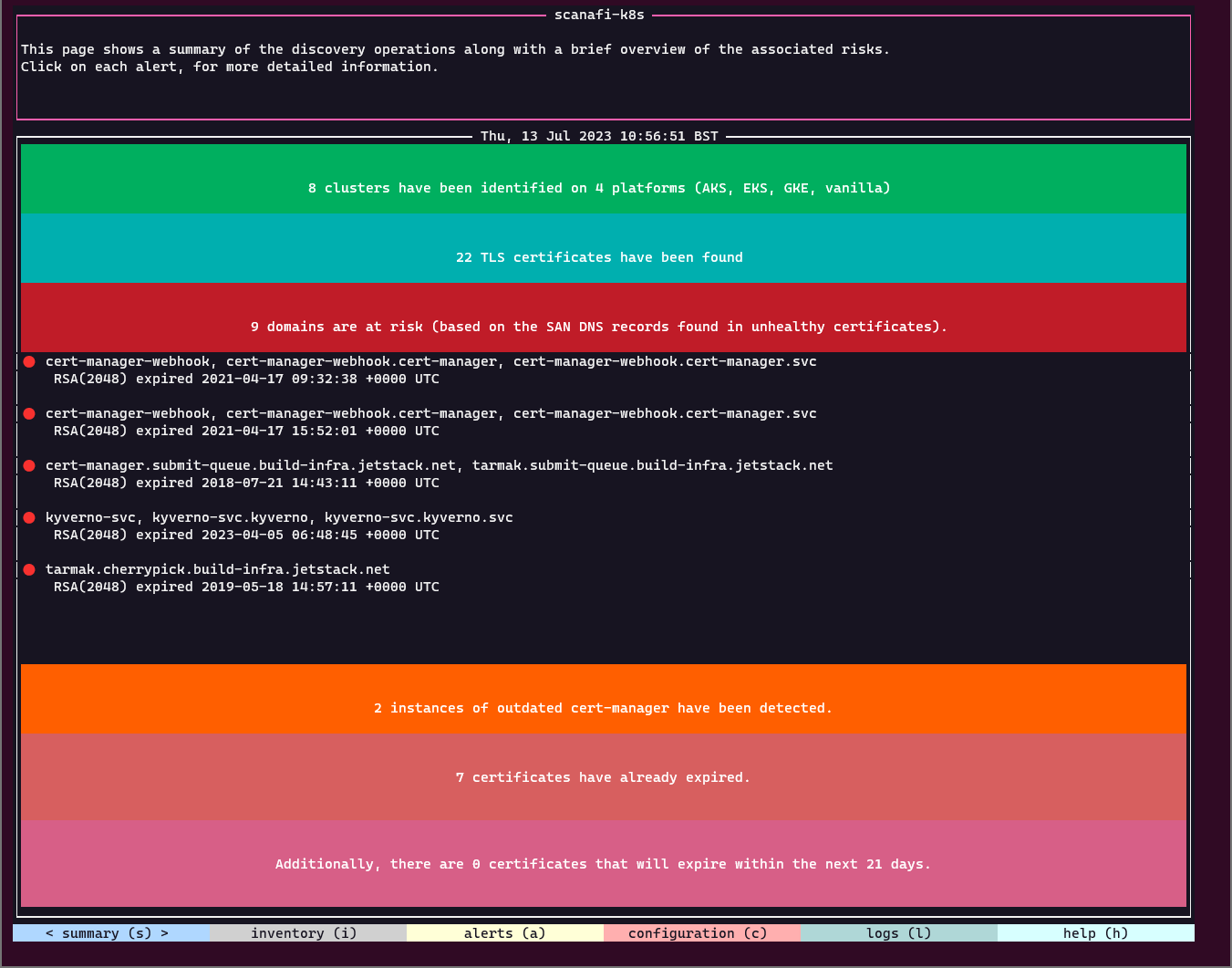
When scanafi-k8s starts up, it shows you a “Summary” page with a live analysis of the ongoing discovery operations. You can click each analysis button to learn more about the resources involved.
TLS certificates, cert-manager, Kubernetes Inventory
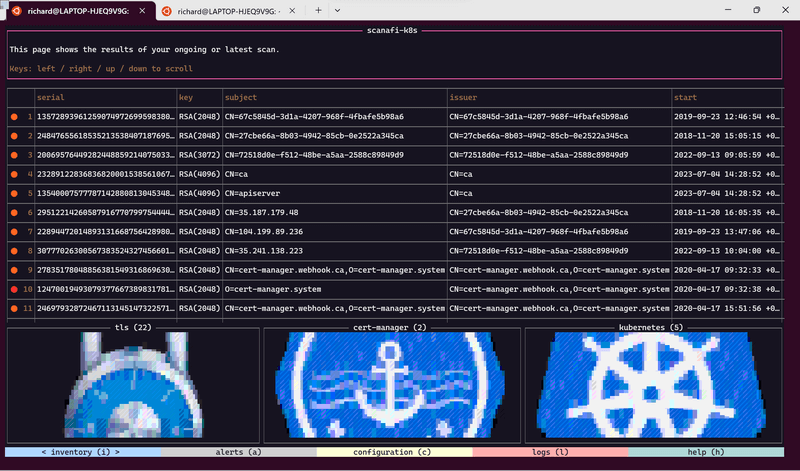
scanafi-k8s shows you a table of all the Kubernetes clusters it finds, and a table of all the cert-manager installations and TLS certificates that it can find inside the Kubernetes clusters.
You can use this to learn about the Kubernetes clusters that you have access to in your organization. And you can use it to learn the status of the TLS infrastructure across all clusters.
Alerts and Warnings
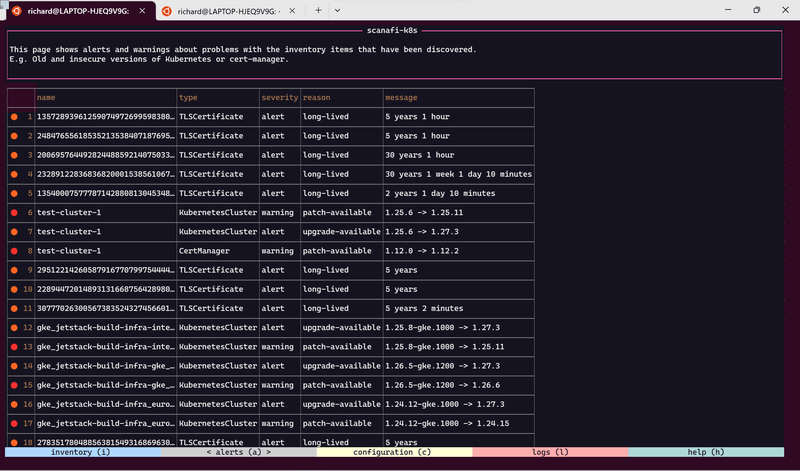
scanafi-k8s reports the following (a)lerts and (w)arnings:
- TLS certificates that are: expired (w), soon-to-expire (a), or very-long-lived (a).
- cert-manager installations that are: unpatched (w), out-of-date (a), or unsupported (w).
- Kubernetes clusters that are: unpatched (w), out-of-date (a), or unsupported (w).
Cloud Scanning
If you have cloud provider credentials on your workstation, scanafi-k8s will attempt to connect to the cloud provider and report any managed Kubernetes clusters in that cloud. AWS, Azure, and Google Cloud are supported.
ℹ️ Note If you do not have cloud credentials on your workstation, try running the tool on a computer that does have them or share these instructions with a member of your platform team and invite them to run the tool for you.
KUBECONFIG Scanning
If you have used kubectl on your workstation, scanafi-k8s will identify and report all the clusters to which you have access. It will then attempt to establish connections with each of these clusters using the credentials stored in your KUBECONFIG file.
Kubernetes Version Scanning
scanafi-k8s will attempt to detect the version of each discovered Kubernetes cluster.
cert-manager Scanning
scanafi-k8s will connect to any of the discovered clusters that you have a credential for in your KUBECONFIG file, and it will detect the version of cert-manager if it is installed in the cluster.
## Kubernetes TLS Secret Scanning
If you have a credential in your KUBECONFIG file for any of the discovered clusters, scanafi-k8s will connect to those clusters, list all the TLS Secret resources, and download only the public part of any TLS certificates inside those Secrets.
Licence
scanafi-k8s is released under the terms of the Venafi End User License Agreement.
Please read the Venafi End User License Agreement carefully before installing scanafi-k8s.
If you do not agree to the terms of this agreement, please discontinue the installation process.
Support and Contact
Please visit Venafi Customer Support for help or support if you encounter problems or have questions.